Build a Distance-Controlled Servo with Arduino
What if your Arduino could measure how far away something is — and physically respond by moving?
That's what we're building: an ultrasonic distance sensor measures the distance to an object, and a servo motor rotates to an angle that matches. Move your hand closer, and the servo sweeps one way. Move it further, and it sweeps the other. It's a distance gauge with a physical needle — and the foundation for countless robotics projects.
This project brings together input (measuring the real world with ultrasound) and output (precise mechanical movement) in a way that feels genuinely interactive. Along the way, you'll learn how to time sound pulses at the microsecond level, control a motor's exact position, and use the map() function to translate between different value ranges.
Let's build.
What You'll Need
- Arduino Uno board (or compatible clone)
- USB cable (Type A to Type B)
- 1 × HC-SR04 ultrasonic distance sensor (the blue board with two metal cylinders)
- 1 × SG90 micro servo motor (the small blue motor with 3 wires)
- 6 × jumper wires
- A computer with the Arduino IDE installed
Both the HC-SR04 and SG90 are among the most common components in Arduino kits. If you've got a starter kit, they're almost certainly included.
Know Your Components
The HC-SR04 Ultrasonic Sensor
This sensor measures distance the same way a bat navigates — by sending out a sound pulse and timing how long it takes to bounce back.
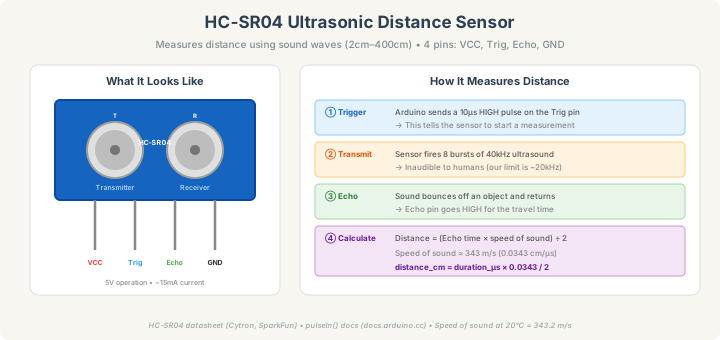
The two metal cylinders are ultrasonic transducers: one transmits a burst of 40 kHz sound (far above human hearing), and the other listens for the echo. The time between sending and receiving tells you the distance to the nearest object.
The sensor has 4 pins:
- VCC — 5V power
- Trig (Trigger) — you send a brief pulse here to start a measurement
- Echo — the sensor holds this HIGH for a duration proportional to the distance
- GND — ground
The math is straightforward. Sound travels at about 343 meters per second (at 20°C). The echo time includes the trip to the object and back, so you divide by 2:
Distance (cm) = Echo time (μs) × 0.0343 / 2
The sensor's range is approximately 2 cm to 400 cm, though accuracy drops significantly beyond 200 cm.
The SG90 Servo Motor
A servo isn't like a regular motor that just spins. You tell it an exact angle — say, 90° — and it rotates to that position and holds it there.
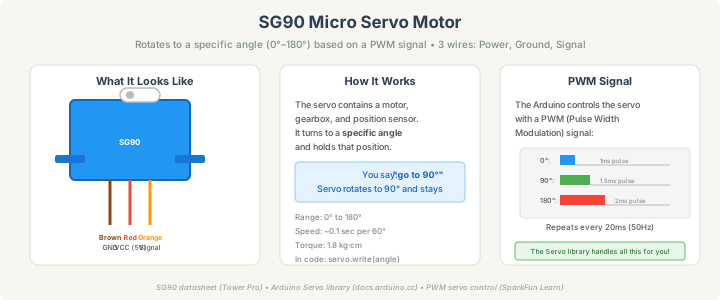
Inside the plastic case is a DC motor, a set of gears (for torque), and a potentiometer (for position feedback). The servo constantly measures its own angle and adjusts to match the target you've set.
The SG90 has 3 wires, usually color-coded:
- Brown — GND
- Red — VCC (5V)
- Orange — Signal (PWM control)
The Arduino controls the servo's position using PWM (Pulse Width Modulation). But you don't need to worry about the details — the built-in Servo library handles everything. You just call servo.write(90) to go to 90°.
Wiring It Up
Two components, six wires, no breadboard needed.
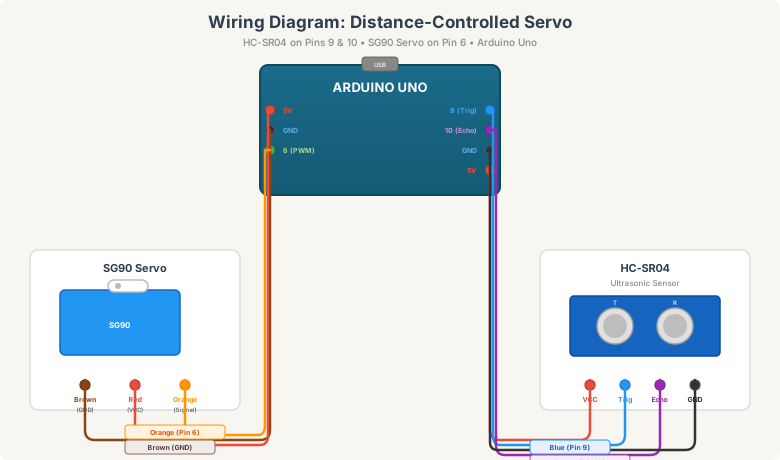
Ultrasonic sensor (4 wires)
Red wire: HC-SR04 VCC → Arduino 5V
Blue wire: HC-SR04 Trig → Arduino Pin 9
Purple wire: HC-SR04 Echo → Arduino Pin 10
Black wire: HC-SR04 GND → Arduino GND
Servo motor (3 wires)
Brown wire: Servo Brown → Arduino GND
Red wire: Servo Red → Arduino 5V
Orange wire: Servo Orange (Signal) → Arduino Pin 6
Pin 6 is a PWM-capable pin (marked with ~ on the board), which the Servo library needs.
Both the sensor and servo share the same 5V and GND from the Arduino. The SG90 draws about 150–250 mA when moving; the Arduino's USB power can handle this for a single servo. If you add more servos, you'll need an external power supply.
The Code
Step 1: Test the distance sensor
Before combining both components, let's verify the sensor works. Upload this sketch:
int trigPin = 9;
int echoPin = 10;

void setup() {
  Serial.begin(9600);
  pinMode(trigPin, OUTPUT);
  pinMode(echoPin, INPUT);
}

void loop() {
  digitalWrite(trigPin, LOW);
  delayMicroseconds(2);
  digitalWrite(trigPin, HIGH);
  delayMicroseconds(10);
  digitalWrite(trigPin, LOW);

  long duration = pulseIn(echoPin, HIGH);
  float distance = duration * 0.0343 / 2;

  Serial.print("Distance: ");
  Serial.print(distance);
  Serial.println(" cm");

  delay(100);
}
Open the Serial Monitor (baud rate 9600). You should see distance readings updating in real time. Hold your hand in front of the sensor and move it closer and further away — the numbers should change smoothly.
If you see 0 constantly, check your Trig and Echo wiring. If you see wildly jumping numbers, make sure the sensor is facing a flat surface (angled or soft surfaces scatter the sound).
Step 2: The distance-controlled servo
Now let's add the servo:
#include <Servo.h>

int trigPin = 9;
int echoPin = 10;
int servoPin = 6;

Servo myServo;

void setup() {
  Serial.begin(9600);
  pinMode(trigPin, OUTPUT);
  pinMode(echoPin, INPUT);
  myServo.attach(servoPin);
  myServo.write(90);
}

void loop() {
  digitalWrite(trigPin, LOW);
  delayMicroseconds(2);
  digitalWrite(trigPin, HIGH);
  delayMicroseconds(10);
  digitalWrite(trigPin, LOW);

  long duration = pulseIn(echoPin, HIGH);
  float distance = duration * 0.0343 / 2;

  if (distance > 0 && distance <= 200) {
    int angle = map(distance, 2, 50, 0, 180);
    angle = constrain(angle, 0, 180);
    myServo.write(angle);

    Serial.print("Distance: ");
    Serial.print(distance);
    Serial.print(" cm → Servo: ");
    Serial.print(angle);
    Serial.println("°");
  }

  delay(50);
}
Upload it, and move your hand in front of the sensor. The servo should track your hand position: close = one end, far = the other.
Understanding the code
Trigger sequence: The three-line trigger pulse (LOW → HIGH for 10μs → LOW) tells the sensor to fire one measurement. This precise timing initiates the 8-pulse 40 kHz burst.
pulseIn(echoPin, HIGH) — This Arduino function measures how long the Echo pin stays HIGH, in microseconds. It's blocking (the Arduino waits until the pulse ends), but at the speed of sound, even a 4-meter measurement takes only about 23 milliseconds.
distance = duration * 0.0343 / 2 — Converts microseconds to centimeters. The 0.0343 is the speed of sound in cm/μs. We divide by 2 because the sound travels to the object and back.
map(distance, 2, 50, 0, 180) — This is the key function. map() takes a value from one range and scales it to another. Here, a distance of 2 cm maps to 0°, and 50 cm maps to 180°. Distances between are mapped proportionally. You can adjust the 50 to change how far your "range" extends.
constrain(angle, 0, 180) — Ensures the angle stays within the servo's physical limits, even if the distance is outside the expected range. Without this, the servo might try to go past its stops, which causes buzzing and potential damage.
if (distance > 0 && distance <= 200) — Filters out bad readings. A distance of 0 usually means no echo was received (out of range or misaligned). Readings beyond 200 cm are increasingly unreliable with the HC-SR04.
delay(50) — A small pause between measurements. The HC-SR04 needs about 30ms between readings. The 50ms delay also smooths out servo movement, preventing jitter.
Troubleshooting
Servo twitches or buzzes but doesn't move smoothly. This usually means the Arduino's USB power isn't providing enough current. Try a shorter USB cable, a powered USB hub, or power the servo from an external 5V supply (connect its GND to the Arduino's GND).
Distance reads 0 all the time. The sensor isn't receiving an echo. Check that Trig is on pin 9 and Echo is on pin 10 (not swapped). Point the sensor at a flat, hard surface within 50 cm.
Distance is stable but servo doesn't respond.
Confirm the servo signal wire is on pin 6 (a PWM pin). Try myServo.write(0) then myServo.write(180) in setup with delays to verify the servo itself works.
Readings are noisy or jumpy. Ultrasonic sensors can get false readings from soft materials, angled surfaces, or nearby objects causing multipath reflections. You can smooth the readings by averaging multiple samples:
float getSmoothedDistance() {
  float total = 0;
  for (int i = 0; i < 5; i++) {
    digitalWrite(trigPin, LOW);
    delayMicroseconds(2);
    digitalWrite(trigPin, HIGH);
    delayMicroseconds(10);
    digitalWrite(trigPin, LOW);
    total += pulseIn(echoPin, HIGH) * 0.0343 / 2;
    delay(10);
  }
  return total / 5;
}
Make It Your Own
Parking sensor: Add a buzzer that beeps faster as the distance decreases — just like a car's parking sensor. Map the distance to tone() frequency or delay between beeps.
Radar sweep: Mount the ultrasonic sensor on the servo, sweep it back and forth, and log the distance at each angle. Send the data to the Serial Monitor and visualize it on your computer — you've built a sonar radar.
Security tripwire: Set a baseline distance. If anything enters the sensor's path (distance suddenly drops), trigger an alarm — LED, buzzer, or serial alert.
Height gauge: Mount the sensor facing down from a fixed point. It measures the distance to whatever is below it, giving you a height measurement of objects placed underneath.
Smooth servo movement: Instead of jumping to the target angle instantly, move one degree at a time with small delays — this gives the servo a smooth, professional-looking sweep.
What You Just Learned
This project combined precise timing measurement (microsecond-level pulse detection) with precise mechanical control (degree-level servo positioning). You learned how ultrasonic sensors measure distance using the speed of sound, how servo motors use PWM to hold exact angular positions, and how the map() function translates between different value ranges — a technique you'll use constantly in sensor-to-actuator projects.
More importantly, this is your first project where a sensor directly drives an actuator in real time. The Arduino reads the world, makes a decision, and physically responds. That's the core loop of robotics, automation, and interactive installations. Every robot, every CNC machine, every self-driving car runs some version of this same pattern: sense → process → act.
Part of the Arduino Intermediate series. Previous: Temperature Monitor (Arduino Uno) • Wi-Fi Weather Station (ESP8266) • Motion-Activated Light (Raspberry Pi) • Beginner series: Basics • First Blink • LED + Resistor • Button LED • Auto-Nightlight